Your photos say more than you think.
Before You Share reads them first, privately, on your NAS.
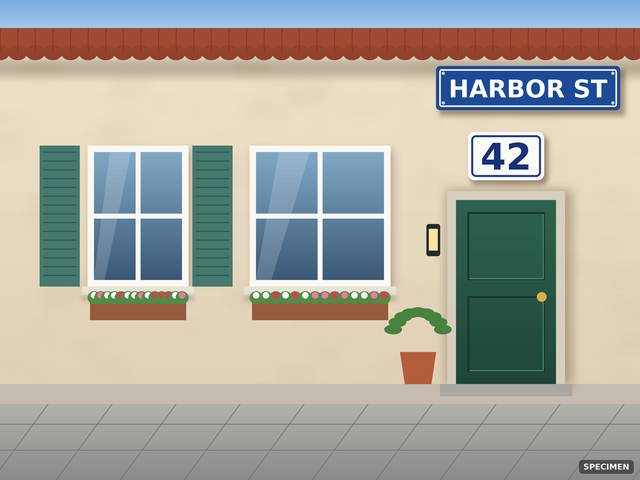 ADR
- Photo
- B07-house-front.jpg
- Found
- House number visible
- Where
- Top right
- Seen by
- Text and vision
- Fix
- Crop the top right, or leave it out
Keep private
Names the type and the place. Never the number.
Which of these photos can you share?
Simulation with fictional photos stamped “SPECIMEN”. Expected results from the validation plan, not live NAS output.
What the Skill delegates
Up to 20 photos a run. Both readings go in batches of 5, and verdicts arrive batch by batch.
12 photos, not checked yet.
Ready to write, after your approval
Why a second look matters
A beach photo can carry the GPS position of your home. Most leaks are noticed only after the photo is out.
Three experts, two readings, one verdict
The Skill is Markdown only. The NAS’s registered experts do every reading.
What phones already doShare sheets can strip location, and one phone maker blurs ID cards photo by photo. None audits your library and the albums you already shared, privately, on your own storage.
Every reading runs on a NAS expert
Text reading and visual reading are separate delegations. Neither sees the other’s answer.
-
photo-agent
Finds the photos, reads metadata, matches your personal rules, runs both readings and creates the album.
search-picturemetasearch-classifyvision-ocrvision-vlmcreate-album
-
file-agent
Reads and adds the Keep private tag. Resolves folders you name.
tag-get-filetag-add-filefind
-
knowledge-agent
Answers from official UGREEN documentation only.
answer-official
Quick to worry, slow to clear
One reading is enough to raise a concern. Clear needs both readings and the metadata, all completed.
One reading saw something
- Visual readingpossible plate
- Text readingnothing readable
Check thisOne witness is enough to stop.
All three completed and found nothing that matters
- Text readingcompleted
- Visual readingcompleted
- Metadatacompleted
ClearNever on a single reading.
Metadata facts, personal-rule matches and vision-only types (keys, background faces) confirm on their own.
Your rules, checked by the NAS’s own face recognition
Write a rule once, in your words. Step 4 asks the library’s people index which photos show that person, before any reading runs.
Matches become Keep private for the audiences the rule covers. The name appears only in the rule line, never in a tag or an album.
- Rule
- Never show Mia’s face publicly
- Covers
- Public, Marketplace
- Checked by
- photo-agent, people index
- Actions
- search-classify, search-picture
Keep private
The name must be a person your library already recognizes.
Same house number, three audiences
Fine for grandma, wrong for the internet.
- Red: Keep private once confirmed
- Amber: Fix first
- Info: noted, never blocks
- As your rule says
| Risk | Private | Public | Marketplace |
|---|---|---|---|
LOC GPS location | Info | Amber | Amber |
ADR House number or address | Info | Red | Red |
PLT License plate | Info | Amber | Amber |
IDD ID document | Amber | Red | Red |
PAY Payment card | Red | Red | Red |
TKT Ticket, barcode or QR | Amber | Red | Red |
MAL Mail or package label | Info | Red | Red |
SCR Screen with messages | Amber | Red | Red |
COD Password or PIN note | Red | Red | Red |
KEY Keys | Info | Amber | Amber |
SCH School crest or name | Info | Red | Red |
MED Prescription label | Amber | Red | Red |
FAC Background faces | Info | Amber | Amber |
MET Owner or serial metadata | Info | Info | Amber |
RUL Your personal rule | As the rule says | Red | Red |
Marked once, settled every public check after
The Keep private tag is memory the NAS keeps in File Manager. It says a photo is sensitive, never why.
You approve one plan
Then the NAS asks its own approval for each write.
file-agent adds the tag
Only on Keep private photos that do not carry it yet.
The next check knows
For Public and Marketplace, tagged photos are Keep private at once. For Private they are read normally.
Try it above: approve the plan, then run the check again. Back to the check
Nothing leaves the NAS
A cloud check would upload exactly what you are trying to protect.
No external calls
Every reading runs on the NAS’s own experts. Nothing is uploaded.
Types and positions only
It says “house number, top right”, never the number itself. No place names.
Payment cards never read
Reported only as “payment card visible”.
Read-only until you approve
One plan for you, then the NAS asks again for each write.
Photos stay as they are
It never edits, moves, deletes or shares a photo, or changes permissions.
Only what is yours
Your library and the albums you shared. Never albums shared with you.
A second look, not a guarantee
Tiny text, reflections and context only a person knows can slip through.
Passes the official Skill checker
Checked with the UGOS Skill Creation Tool, uliya-skill-kit 0.7.3.
- Skill
- before-you-share
- Errors
- 0
- Warnings
- 0
- Catalog
- 2.0.0
- Experts
- photo-agent, file-agent, knowledge-agent
static-pass
Delegates only to registered experts.
Six Markdown files
SKILL.mdreferences/verdict-rules.mdreferences/report-format.mdreferences/privacy-and-safety.mdreferences/validation-plan.mdreferences/disclosures.md
No scripts, libraries, models or external calls.